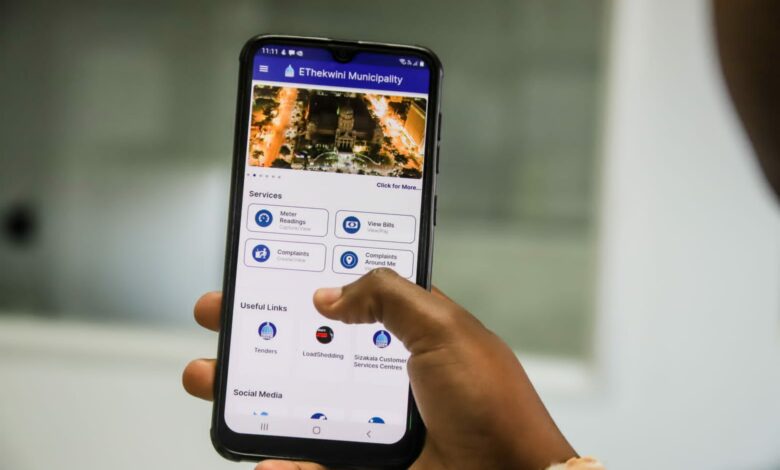

Download the app
You can download the Ethekwini Municipal App from the following platforms:
For Android Users:
Navigate to the Google Play Store: Search for "eThekwini Mobile App" and click on the download button - eThekwini Mobile App - Apps on Google Play
For Apple Users:
Navigate to the Apple App Store: Search for "eThekwini Municipality App" and click on the download button - eThekwini Municipality App on the App Store
For Huawei/HarmonyOS
Navigate to the AppGallery: Search for "eThekwini Municipality App" and click on the download button - AppGallery
features of the ethekweni Municpal app
The Ethekwini Municipal App offers a range of services designed to make life easier for us as residents:
Access to Municipal Bills: View, download, and pay your municipal bills directly from the app
Upload Meter Readings: Easily upload your water and electricity meter readings
Log Faults:Report any faults or issues in your area, such as potholes or broken streetlights
Loadshedding Schedule: Stay updated with the latest loadshedding schedules
Emergency Contacts: Access important emergency contact numbers
Public Services Map: Find public services and facilities near you
News and Alerts: Receive news, traffic alerts, and updates from the municipality
Sizakala Customer Services Centers: Access information about customer service centers
Bus and Water Tanker Schedules: Check schedules for buses and water tankers
Tips for using the Ethekwini municipal app
Linking your App to Eservices will be provided in the Guide How to Link your Eservices Account
Enable Notifications:Make sure to enable notifications to receive real-time updates and alerts.
Regularly Check for Updates: Keep the app updated to access the latest features and improvements.
Explore All Features:Take some time to explore all the features of the app to make the most out of it.
Use the Public Services Map: Utilize the map feature to find nearby public services and facilities.
please share your reference number in the whatsapp group:
When logging Faults, please post them into the Community WhatsApp Group so that we can assist by recording the reference number track and escalate as needed.